



TurboNote+ v7.0

TurboNote v 3.4 — small, easy and free
Our freeware version provides many of the capabilities of TurboNote+. If you'd like to see the difference, check out the comparison chart here.
Provide regular reminders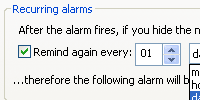 If you´ve got tasks that come up time and again, TurboNote´s recurring alarm function will help keep you organised. The alarms are quick to use, and can even be set to ignore weekends.
Click here for full view |
Remind you of jobs to do Never lose track of important dates, vital information or necessary filenames again. Quickly drag and drop URLs, file paths, selected text. Just grab information or drop it on a TurboNote+ to send to someone, and vice versa. No more risk of mistyping URLs, account numbers or filenames!
|
|---|---|
Communicate quickly TurboNote+ instant messaging lets you instantly send messages and attached files straight to the desktops of your friends and colleagues over a local network or across the Internet. You can even chat directly via a TurboNote.
|
Colour code or template them Pick a colour or background image to suit you. Notes with ruled lines, phone message templates, checklists and other built-in styles let you quickly and easily select the kind of note that suits you.
|
You can use TurboNote freeware on as many computers as you wish without charge. You can give it to anybody, anywhere — even upload it to public FTP and Web sites!
TurboNote freeware is sponsored — the sponsor's URL will appear from time to time at the bottom of a note.
If you'd like to sponsor your own copy, take a look at our sponsor's information page.
How do I get a copy?
To try out the sponsored freeware, download it here. (Vista users only: It is important that you install TurboNote in a folder where all users will have full read+write access, e.g. C:\TurboNote rather than under C:\Program Files\TurboNote")
If you'd like more features, particularly functions like automatic backup, find, chat, rich text, calendar, note manager, calculations and enhanced network support, try our shareware TurboNote+. See the two versions compared, or download the shareware version here
TurboNote is a registered trademark operated under license to WebCentre Ltd